Subscribe to copilot for your personal account

Subscribe to copilot for your personal account

Copilot for personal use is seamlessly integrated into Microsoft 365 Personal and Family plans.

Copilot Plans & Pricing for Personal Users:

Microsoft currently offers two main personal-use options for Copilot in 2025:

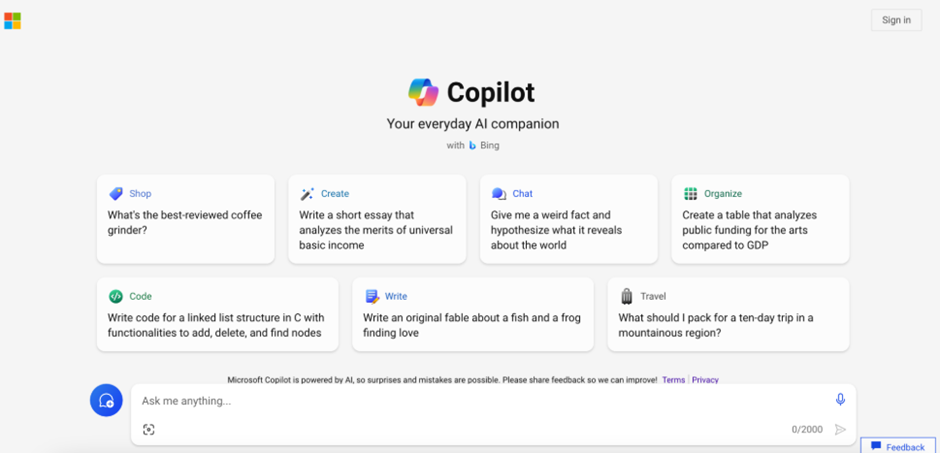
1. Microsoft Copilot Free (Limited Access)

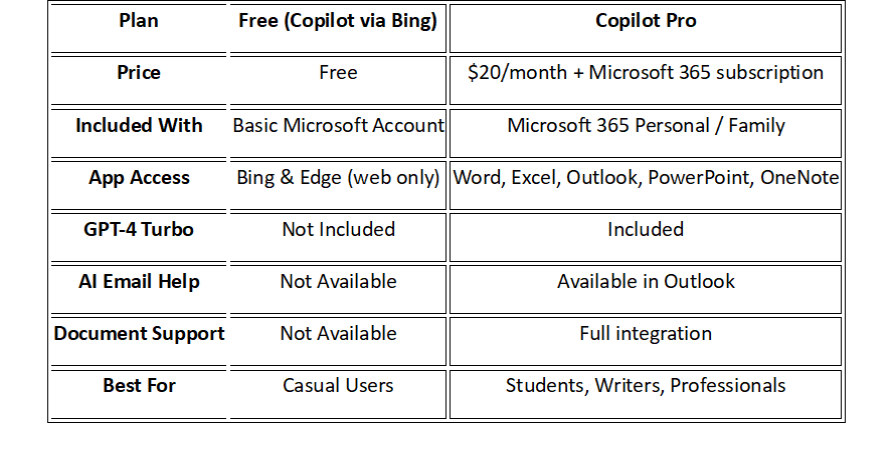
  • Price: Free

  • Included with: Any Microsoft account (no Microsoft 365 subscription required)

  • Apps Supported: Web-based Copilot via Bing and Edge only
  Key Features:

  • Ask general questions in Bing Chat or Edge

  • Summarize websites, generate basic content

  • No access to Word, Excel, PowerPoint, Outlook, or OneNote

  • No GPT-4 Turbo or advanced Microsoft 365 integration

  Number of Users: 1 (per Microsoft account)
  Best For: Casual users exploring AI basics without a subscription

2. Copilot Pro (Full Personal Access)

Price: $20/month (add-on to Microsoft 365)

 Requires one of the following:

  • Microsoft 365 Personal: $9.99/month (for 1 user)

  • Microsoft 365 Family: $12.99/month (for up to 6 users*)

  • Note: Copilot Pro is licensed per user, even in Family plans

    Total Monthly Cost:

  • Personal Plan: $29.99/month

  • Family Plan (1 user only): $32.99/month  
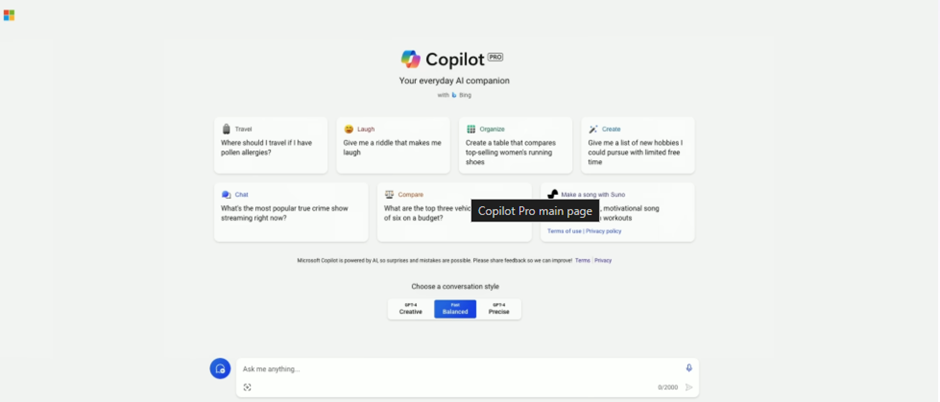
    Copilot Pro Features:

  • Copilot in Word, Excel, PowerPoint, Outlook, and OneNote

  • Priority access to GPT-4 Turbo

  • Content generation, summaries, insights, and writing support

  • Works across Windows, Mac, iOS, and Android

  • Use on multiple devices (based on your Microsoft 365 license)

    Number of Users:

  • Personal Plan: 1 user

  • Family Plan: Up to 6 users, but Copilot Pro must be purchased individually for each user

    Best For: Students, freelancers, professionals, and content creators using Microsoft 365 apps regularly
Benefits of Using Copilot for Personal Tasks

  • Saves Time: Drafts, edits, and organizes content faster.

  • Boosts Creativity: Helps brainstorm, rewrite, and enhance writing.

  • Improves Accuracy: Suggests clean formatting, grammar, and summarization.

  • User-Friendly: Works inside the apps you already know.

   Use Case Example: A student using Copilot to summarize research notes into a paper draft in Word, or a parent planning family finances using Copilot in Excel.

How to Get Started:

Step 1: Check the Requirements

Before subscribing, make sure:

  • You have a Microsoft account (Outlook, Hotmail, Live.com, etc.)

  • You are using a supported region (Copilot Pro is available in most countries, including India, USA, UAE, etc.)

  • You’re using Windows 11, Windows 10, or macOS, and have Microsoft 365 apps (Word, Excel, PowerPoint, Outlook) installed.

  • You want to use advanced AI in Microsoft 365 apps (Word, Excel, etc.), plus priority access to GPT-4 and GPT-4 Turbo.

Step 2: Visit the Copilot Pro Subscription Page

·        Go to the official Microsoft Copilot Pro subscription page:

 https://copilot.microsoft.com/pro
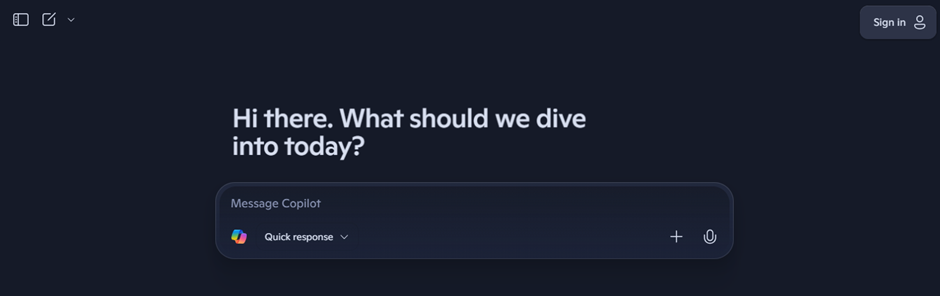
Step 3: Sign In with Your Microsoft Account

  • Click on “Sign In” (top-right corner).

  • Use your personal Microsoft account.

  • If you don’t have one, you can create it here:  https://signup.live.com
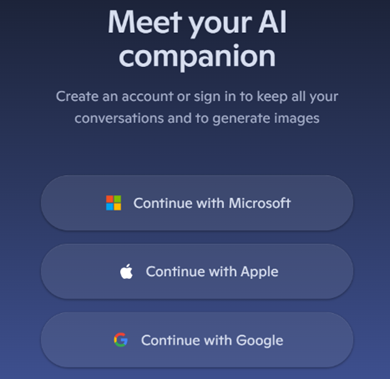
Step 4: Start the Subscription

  • Click on “Subscribe” or “Get Copilot Pro”.

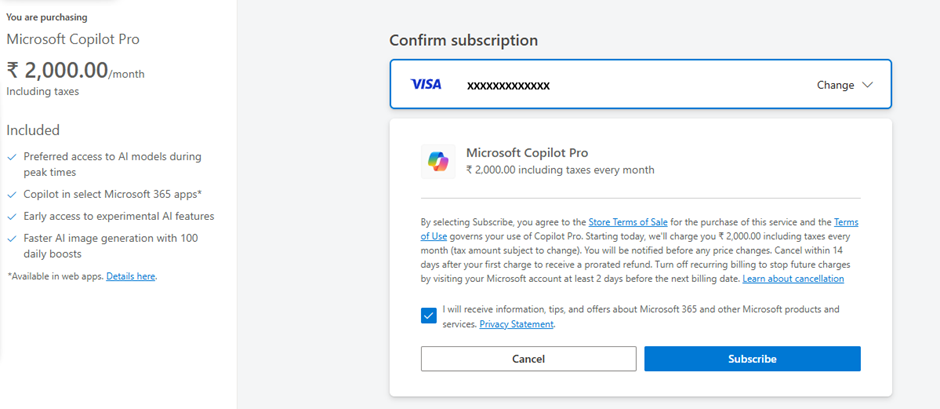
  • You’ll see the pricing (usually $20/month or equivalent in your local currency).
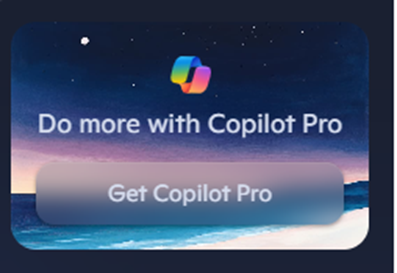
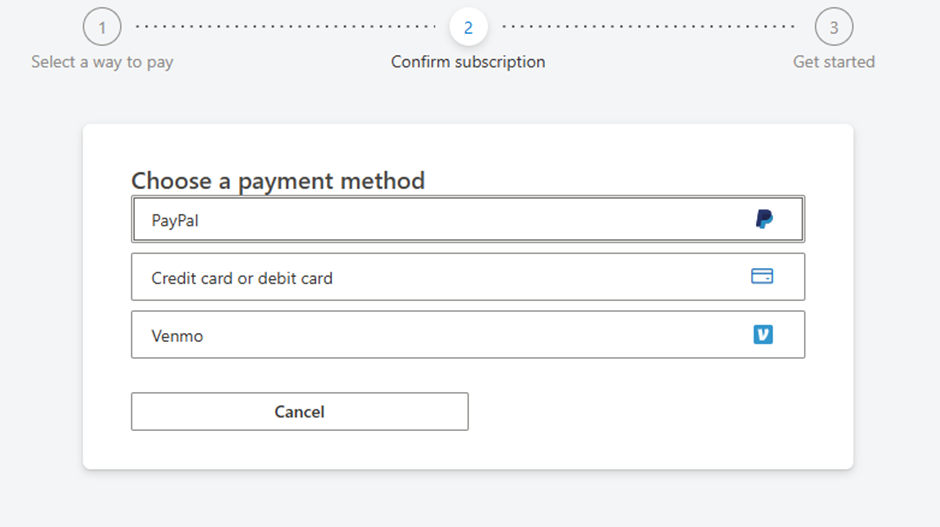
Step 5: Enter Payment Details

  • Add your credit/debit card or PayPal information.

  • Confirm your billing address and click “Confirm” or “Pay”.
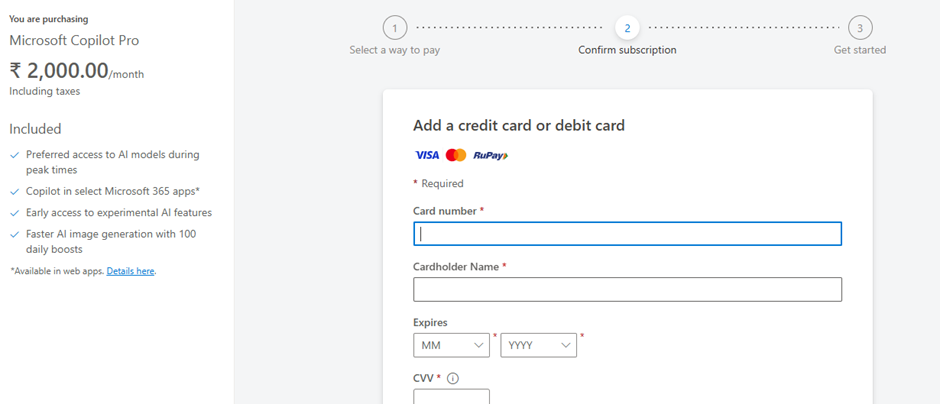
Click 'Subscribe' to complete your subscription to Copilot Pro.
Step 6: Subscription Activated

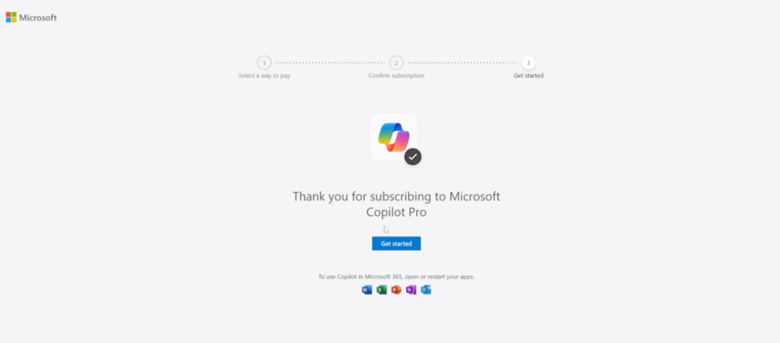
Once payment is processed:

  • You’ll receive an email confirmation.

  • Your Microsoft account now has Copilot Pro enabled.
Step 7: Use Copilot in Microsoft 365 Apps

To use Copilot features:

  • Open Word, Excel, Outlook, or PowerPoint (Office apps must be updated).

  • Sign in with your subscribed Microsoft account.

  • Look for the Copilot button or AI assistant inside the app.

You can also use Copilot Pro online at:  https://copilot.microsoft.com

Note:

  • You can cancel anytime from your Microsoft account billing page:
     https://account.microsoft.com/services

  • Make sure your Office apps are updated for Copilot features to appear.

  • This subscription does not include Microsoft 365 license — you need to have Office apps installed already.

It’s that simple. No additional downloads, no steep learning curve.

If you’re looking to stay ahead in a world where time is your most valuable resource, it’s time to invite Copilot into your everyday life.


Microsoft Copilot - AI Business Practitioner Certified Training Program

Buy nowLearn more

Getting Started

  • View Copilot Program Brochure
  • Access Demo Class Recording
  • Join a Live Demo Class
  • View Copilot Academic Calendar
  • View Copilot Upcoming Schedule
  • Subscribe to copilot for your personal account
  • Enroll Now
  • Access Student Study Kit
  • Important Links

Prompt Engineering

  • Prompts Library for MS Office
  • Prompt Engineering Formula
  • Prompt Engineering - Comprehensive Guide
  • Prompt Engineering - PMI
  • Persona Based Prompts
  • Prompt Engineering for Business users
  • Descriptive Prompts
  • Instructional Prompts
  • Creative Prompts
  • Contextual Prompting
  • 300 personas2

Module 1: Foundations of LLM models & prompt engineering

  • Copilot MS 365 interface walkthrough
  • Basics of prompt engineering
  • Prompting techniques for business practitioners

Module 2: Microsoft Office productivity tools with Copilot

  • Develop Excel formulas, functions, pivot tables, charts, graphs and dashboards with Excel Copilot & Excel Agent
  • Use semantic search in Outlook emails, draft and respond to emails with customized instructions based on business functions
  • Draft & refine official letter using Word, generate insights from long Word documents, analyze risks on Word documents. Compare with Pitch Power & Humata for official documentation
  • Collaborate effectively with Teams, capture meeting notes and perform custom prompts on meeting transcripts

Module 3: Persona based prompting, projects & notebooks

  • Understand role-specific prompting for analysts, managers, and strategists
  • Develop customized notebooks with Copilot for specific tasks & functions
  • Create storage vectors for projects & notebooks with custom personas & OneDrive

Module 4: Research, analytics, KPIs & strategy with AI agents

  • Conduct descriptive analytics with AI analytics agent on group of Excel sheets, PDFs, CRM feeds, Fabric & Azure data sources & other enterprise resources

Module 5: Workflow automation, enterprise AI tools & business app creation using AI

  • Create business apps using Copilot for Power Apps, app builder in Copilot 365, compare Google AI Studio & Replit
  • Automate business process using workflow frontier and Power Automate with Copilot, compare with Make.com & N8N workflows
  • Use Copilot for OneDrive - smart retrievals, comparing file versions and document management
  • Use Copilot for SharePoint to create pages, posts, lists, libraries, surveys and forms
  • Integrate SharePoint, Power Apps & Power Automate for end to end business process mining and workflow automation
  • Copilot for Loop & Power Pages portal

Module 6: Machine learning model for predictive and prescriptive modelling

  • Predictive analytics and forecasting using different machine learning models - why, when, where & how
  • Create financial models for planning and budgeting
  • Analytics prompting using ML model - types and functions

Module 7: Graphics & video generation using AI

  • Create infographics with Copilot Create, KIMI & Nano Banana Pro
  • Document to video using Copilot Create

Module 8: Agent creation using Copilot, Gemini Pro, Claude & custom GPT

  • Foundations of instructional prompting, contextual grounding, chain of thoughts prompting, linked prompts, & comparative prompts
  • Copilot Studio overview and capabilities deep dive - instructions, topics, tools, MCPs, knowledge, channels & evaluations
  • Build, test & deploy a custom RAG agent with Copilot, SharePoint & OneDrive
  • Evaluations & groundings for RAG agents

Module 9: AI agentic framework - MCPs, tools, triggers & automation workflow with Copilot Studio

  • Create focused topics with variables, triggers & conversational flow
  • Trigger agent workflow based on a condition and trigger external workflow from agents using Power Automate
  • Tag triggers, topics, tools & knowledge sources with contextual instructions
  • Create & integrate MCP servers & protocols for internal & external apps action & data retrieval
  • Build connections between AI agents & develop a comprehensive AI agentic framework

Assignments

  • Week 1 Assignment - Personal Productivity Using Microsoft Copilot & Microsoft 365 Applications
  • Week 2 Assignment - AI Agents, Workflow Automation & Collaborative Productivity Using Microsoft Copilot
  • Week 3 Assignment - Autonomous AI Agents, Intelligent Frameworks & Advanced Copilot Systems

Microsoft Copilot - Cohort 18

  • Class Video 1: Microsoft Copilot Integration and Applications
  • Class Video 2: Microsoft Copilot Excel Integration
  • Class Video 3: Excel Functionalities and Copilot Features
  • Class Video 4: AI agents, Personas and Various Tools for Document Management and Business applications
  • Class Video 5: Microsoft 365 Copilot Training Overview
  • Class Video 6: Details about Machine Learning Models
  • Class Video 8: Enterprise LLM Data Processing Capabilities
  • Class Video 9: Customizing AI Agents with Copilot
  • Class Video 7: Recap - Microsoft Office Personal Productivity Apps
  • Class Video 10: AI Datasets and Prompt Engineering
  • Class Video 11: AI Certifications and Microsoft Copilot
  • Class Video 12: AI Agent Customization and Multilingual Support
  • Class Video 13: AI Certifications and Implementation Challenges

Microsoft Copilot - Cohort 19

  • Class Video 1: AI Training for Practical Implementation and Microsoft Copilot subscriptions
  • Class Video 2: Basic Prompt Engineering and Exploring the Various LLM Capabilities and Features
  • Class Video 3: Microsoft Office Personal Productivity Apps
  • Class Video 4: Copilot for Office Productivity - Webinar
  • Class Video 5: Microsoft 365 Copilot Access Issues
  • Class Video 6: Customizing AI Agents with Copilot
  • Class Video 7: AI Datasets and Prompt Engineering
  • Class Video 8: AI Certifications and Microsoft Copilot
  • Class Video 9: Power BI, Power Apps and Automate Integration
  • Class Video 10: AI Agent Customization and Multilingual Support
  • Class Video 11: AI Certifications and Implementation Challenges

Microsoft Copilot - Cohort 20

  • Class Video 1: Prompting Techniques with Persona For Word , Excel, Power Point, Teams and Etc.
  • Class Video 2: Introducing Microsoft Copilot's capabilities across various Microsoft applications
  • Class Video 3: AI analytics and Microsoft Copilot capabilities
  • Class Video 4: Predictive Analysis and Machine Learning Models using AI tools like Chat GPT and Microsoft Copilot
  • Class Video 5: Microsoft 365 Copilot and AI capabilities
  • Class Video 6: AI Agent Framework
  • Class Video 7: Microsoft Copilot and AI agent capabilities
  • Class Video 8: Microsoft Copilot agents and Model Context Protocols (MCPs) for Business Applications
  • Class Video 9: Reviewing Agent Creation Assignments and Discussing Practical AI Implementation Strategies

Microsoft Copilot - Cohort 21

  • Class Video 1: AI Copilot Class Introduction Meeting
  • Class Video 2: Microsoft Copilot System Access Training
  • Class Video 3: Microsoft Copilot Capabilities, Particularly within Microsoft Teams
  • Class Video 4: Microsoft Copilot's Creative Capabilities
  • Class Video 5: Microsoft Copilot capabilities, Covering Both Personal Productivity Tools and AI Agents
  • Class Video 6: Microsoft Copilot Persona Definition Strategy
  • Class Video 7: AI Productivity Tools Training Session
  • Class Video 8: Claude AI capabilities
  • Class Video 9: AI Agents and Implementation using Microsoft Copilot Studio
  • Class Video 10: Microsoft's Power Platform capabilities, Particularly SharePoint, Power Automate, Power Apps, and Copilot AI features
  • Class Video 11: Application Development Capabilities in Microsoft Copilot
  • Class Video 12: Fundamentals of AI agents and Clarifying the differences between Various AI platforms
  • Class Video 13: AI agent creation using Microsoft Copilot Studio
  • Class Video 14: Creating and Configuring AI agents in Microsoft Copilot

Microsoft Copilot - Cohort 22

  • Class Video 1: AI Training for Business Practitioners
  • Class Video 2: Microsoft Copilot features across Microsoft Office Applications, Specifically Word and Excel
  • Class Video 3: Microsoft Copilot 365 Productivity Training
  • Class Video 4: Microsoft Copilot Features Progress Review
  • Class Video 5: Microsoft Copilot Excel Capabilities
  • Class Video 6 : Getting the AI Agents Developed by GPT, Claude and Copilot Studio

Microsoft Copilot - Cohort 23

  • Class Video 1: AI and Copilot Introduction Session
  • Class Video 2: AI Entrepreneurship Training Program

Special Class Recordings

  • Power App and Power Automate

Case Studies, Q&A, Presentation & Internship

  • Learn from industry case studies and success stories
  • Participate in live Q&A with trainers and practitioners
  • Build and present your internship project
  • Develop an agent, personas, prompt library and agentic framework
  • Showcase your solution for a real business process

Microsoft Copilot Agent - Development & Deployment

  • Get started working with environments
  • Create agents and work with the Microsoft Copilot Studio interface
  • Create topics
  • Enhancing productivity with Generative AI
  • Test your agents
  • Publish agents and analyze performance
  • Copilot Studio - Login details
  • Copilot Agent - Risk Analyst Agent
  • Copilot Agent - Lesson Plan Generator
  • Copilot Agent - HR Agent
  • PPT - Get started with Microsoft Copilot Studio